
- Published on
Understanding CGM Lag Time: Blood vs. Interstitial Fluid
Have you ever found yourself staring at two different numbers and feeling a wave of confusion? You check your Continuous Glucose Monitor (CGM) and see a reading of 145 mg/dL with an arrow pointing up. To be sure, you wash your hands, pull out your traditional glucose meter, and perform a finger-prick test. The meter flashes 115 mg/dL. In that moment, it’s natural to feel frustrated or even lose trust in your technology. You might wonder, "Which one is lying to me?"
The truth is, neither device is necessarily wrong. They are simply measuring glucose in two different "compartments" of your body. Understanding the relationship between these two measurements—and the physiological lag time that exists between them—is one of the most important skills you can develop in your journey toward metabolic health. Whether you are managing Type 1 diabetes, Type 2 diabetes, or simply optimizing your wellness, mastering the "why" behind these discrepancies will help you make more confident decisions about your food, exercise, and insulin.
The Tale of Two Fluids: Blood vs. Interstitial Fluid
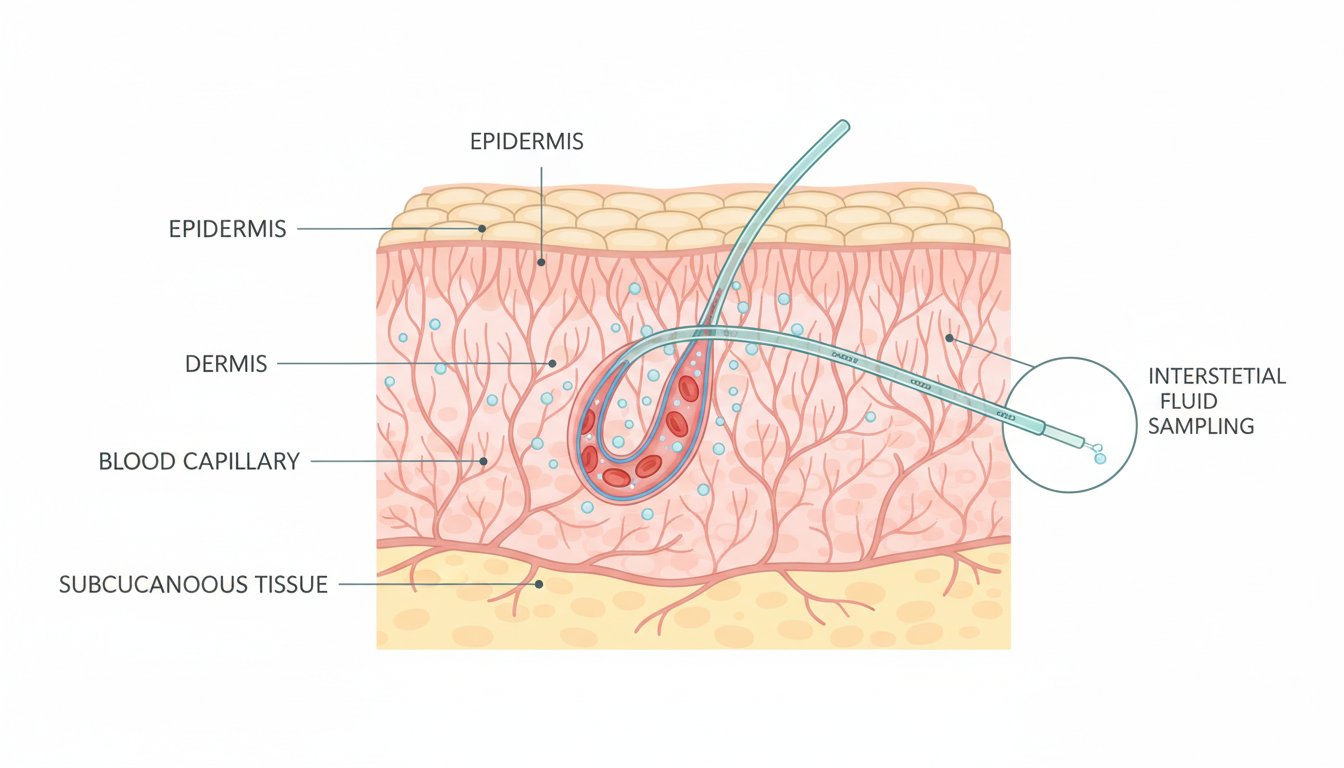
To understand lag time, we first need to look at where these devices get their information. A traditional blood glucose meter measures capillary blood. This is the glucose circulating in your smallest blood vessels, providing a "real-time" snapshot of what is happening in your bloodstream at that exact second.
On the other hand, a CGM sensor sits just under the skin. It does not actually measure your blood. Instead, it measures glucose in the interstitial fluid (ISF). This is the thin layer of fluid that surrounds the cells in your body. Glucose travels from your blood vessels into the interstitial fluid so your cells can use it for energy. Because of this journey from the blood to the fluid surrounding the cells, there is a natural delay.
Think of it like a train pulling into a station. The engine of the train represents your blood glucose, and the caboose represents the glucose in your interstitial fluid. When the train is moving at a steady, slow pace on a flat track, the engine and the caboose are very close together. However, when the train starts climbing a steep hill or zooming down a valley, the distance and the "time" it takes for the caboose to reach the point where the engine just was becomes much more apparent.
Why Does Lag Time Happen?
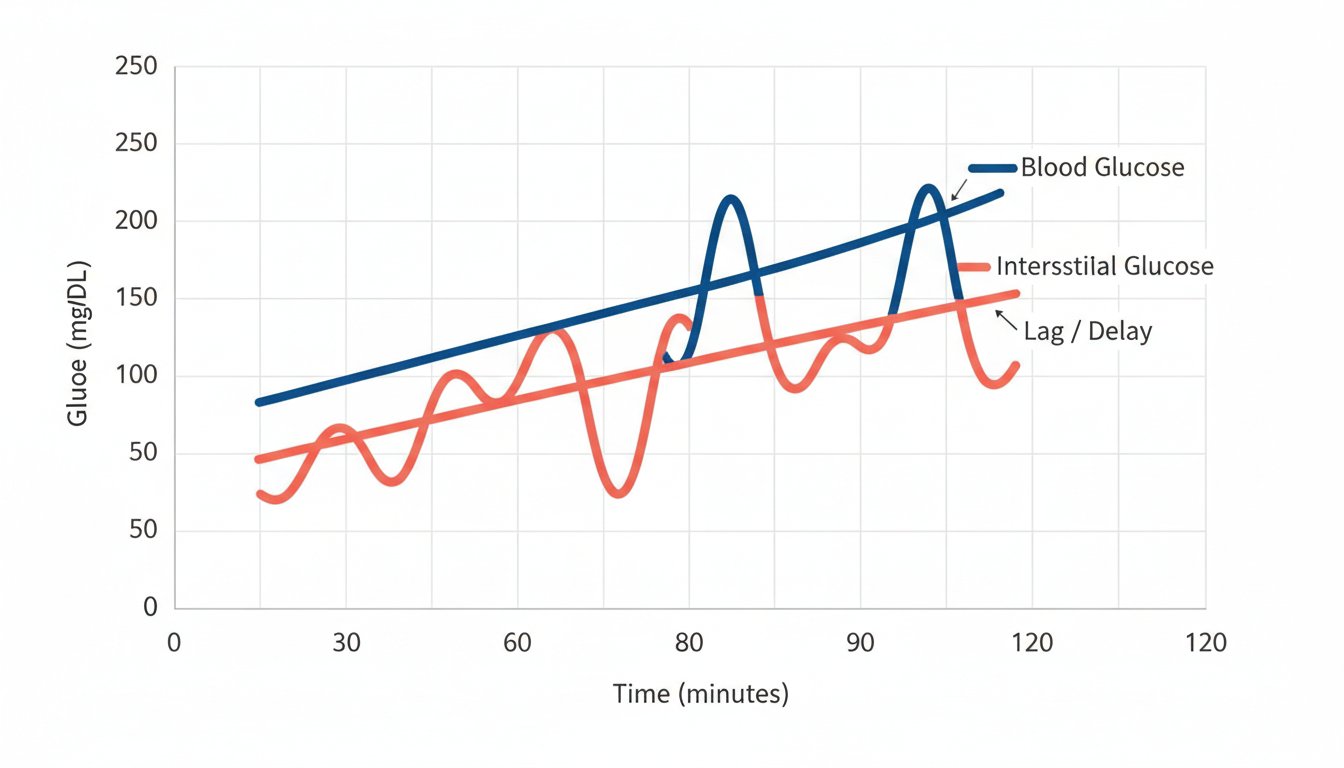
The physiological lag time is generally estimated to be between five and 15 minutes, though it can vary based on the individual and the specific CGM hardware being used. This delay happens because glucose moves via a process called diffusion.
When you eat a carbohydrate-rich meal, glucose enters your bloodstream first. As the concentration of glucose in the blood rises, it creates a "pressure" that pushes the glucose out of the capillaries and into the interstitial space. This process isn't instantaneous. It takes time for the levels to equilibrate.
Factors That Influence the Gap
While the average delay is about 10 minutes, several factors can make the gap between your CGM and your finger-prick feel much wider:
- Hydration Levels: Since interstitial fluid is mostly water, being dehydrated can slow down the diffusion process and potentially affect the accuracy of your sensor readings.
- Metabolic Rate: Physical activity increases blood flow and can sometimes speed up the movement of glucose between compartments.
- Sensor Age: Some users notice that during the first 24 hours of a new sensor "warming up," the lag time or discrepancy might feel more pronounced as the body adjusts to the filament.
- Rapid Fluctuations: The faster your glucose is changing, the more "lag" you will see.
When the Gap Is at Its Peak
If your glucose is stable (represented by a horizontal trend arrow on your CGM), your finger-prick and your sensor reading should be remarkably close. In a steady state, the "engine" and the "caboose" are right next to each other.
However, during times of rapid change, the discrepancy becomes a physiological certainty. There are three main scenarios where you should expect to see a significant difference:
1. After a Meal
Immediately after eating, especially if the meal is high in simple sugars or refined carbs, your blood glucose will skyrocket. Your finger-prick will capture this spike almost immediately. Your CGM, however, is still reading the "old" fluid from 10 minutes ago. In this scenario, your finger-prick might read 180 mg/dL while your CGM still shows 140 mg/dL.
2. During and After Exercise
Intense exercise can cause the liver to dump glucose into the bloodstream for quick energy, or it can cause glucose to drop rapidly as muscles soak up fuel. Because these shifts happen so quickly, the CGM may struggle to keep up with the real-time blood values.
3. When Treating a "Low"
This is perhaps the most critical time to understand lag time. If you experience hypoglycemia (low blood sugar) and consume fast-acting glucose, like juice or glucose tabs, you will feel better within minutes as your blood sugar rises. However, your CGM might continue to alarm "LOW" for another 10 to 15 minutes. This is because the glucose hasn't reached the interstitial fluid yet.
Pro Tip: Always trust a finger-prick over a CGM if you are feeling symptoms of a low, and use the finger-prick to confirm your sugar has returned to a safe range before you stop treating.
How to Manage the Gap Like a Pro
Understanding that a discrepancy exists is the first step. The second step is knowing how to use this information without getting stressed. Here is how to navigate the difference between your devices:
Look at Trends, Not Just Numbers
The greatest power of a CGM isn't the single number it gives you; it's the trend arrow. A finger-prick tells you where you are, but a CGM tells you where you are going. If your meter says 120 mg/dL and your CGM says 140 mg/dL with a double-up arrow, the most important takeaway is that your glucose is rising rapidly. The specific number is less important than the direction and velocity.
Use the "Rule of 20"
In the world of diabetes management, many educators use the "20/20 rule" for CGM accuracy. This means that if your blood sugar is over 80 mg/dL, the CGM is considered accurate if it is within 20% of the lab-verified blood glucose value. If your blood sugar is under 80 mg/dL, it should be within 20 points. Expecting a 100% match every time is a recipe for frustration because of the physiological differences we've discussed.
Don't Over-Calibrate
If your CGM allows for calibration, it is tempting to enter a finger-prick value every time you see a difference. However, calibrating while your glucose is rapidly rising or falling can actually confuse the sensor's algorithm and lead to less accuracy later. Only calibrate when your trend arrow is horizontal and your glucose is stable.
Consult Your Healthcare Provider
Always remember to discuss your tracking methods with your doctor or a certified diabetes care and education specialist. They can help you determine your personal "target range" and how to interpret discrepancies based on your specific health needs.
The Role of Technology in Closing the Gap
While we cannot change human physiology, we can use tools to make sense of the data. Using a glucose tracking app can help you overlay your meals, exercise, and stress levels onto your glucose charts. By logging your meals in GlucoAI, for example, you can begin to see the patterns of how long your specific "lag" lasts after eating certain foods.
When you see a spike on your CGM, you can look back at your logged meal and realize, "Ah, I ate that pasta 20 minutes ago. My blood sugar likely peaked 10 minutes ago, and now my CGM is catching up." This context turns a scary number into a manageable data point.
Key Takeaways
- Different Fluids: Finger-pricks measure capillary blood; CGMs measure interstitial fluid (ISF).
- The Delay: There is a natural 5-15 minute lag while glucose moves from the blood into the ISF.
- Velocity Matters: The faster your glucose is changing, the larger the discrepancy between the two readings will be.
- Trust Your Symptoms: If you feel "low" but your CGM says you are fine, always perform a finger-prick test.
- Focus on Trends: Use your CGM for the "big picture" (arrows and patterns) and your meter for "point-in-time" decisions (like dosing insulin or treating a low).
Managing your metabolic health is a marathon, not a sprint. By understanding the science of lag time, you remove the guesswork and the anxiety of "conflicting" numbers. You aren't just tracking a number; you are learning the unique rhythm of your own body.
If you want to dive deeper into your data and understand how your lifestyle impacts these trends, consider using diabetes management tools like GlucoAI to keep all your insights in one place. By connecting the dots between your habits and your numbers, you can move toward a more stable, energized, and healthy life.
Summary: CGM lag time is a physiological reality caused by the time it takes glucose to move from the blood to the interstitial fluid. While the numbers may differ during rapid changes, both tools are valuable when used correctly. Focus on trend arrows for daily management and finger-pricks for critical safety checks. Always consult your doctor before making changes to your treatment plan.
GlucoAI — Smart Blood Sugar Monitor
Track, analyze, and optimize your glucose levels with AI-powered insights.